Minutes, Not Hours
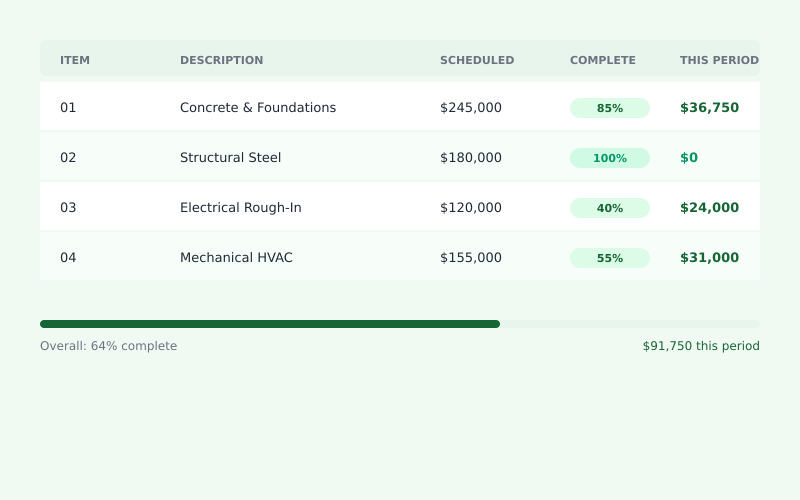
Import your schedule of values once. Each month, just update completion percentages. DrawBill handles the math and generates your G702/G703 automatically.
Create AIA G702 & G703 pay applications in minutes. AI-powered billing for general contractors, subcontractors, and construction managers.
Be first in line when we launch. No spam.
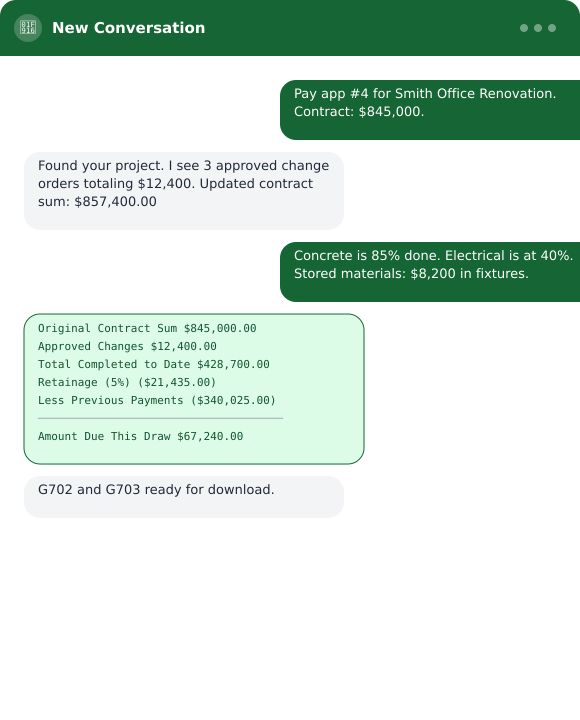
Every month, the same story: dig through spreadsheets, manually calculate percentages, chase down change orders, and pray you didn’t miss something on the schedule of values. One math error and you’re explaining yourself to the GC — or worse, waiting another 30 days for payment.
Construction billing shouldn’t take half a day every month. But between tracking completed work, calculating retainage, and formatting everything to match the AIA forms, it does.
Core Features
Every tool is designed to eliminate the friction between finishing work and getting paid.
Import your schedule of values once. Each month, just update completion percentages. DrawBill handles the math and generates your G702/G703 automatically.
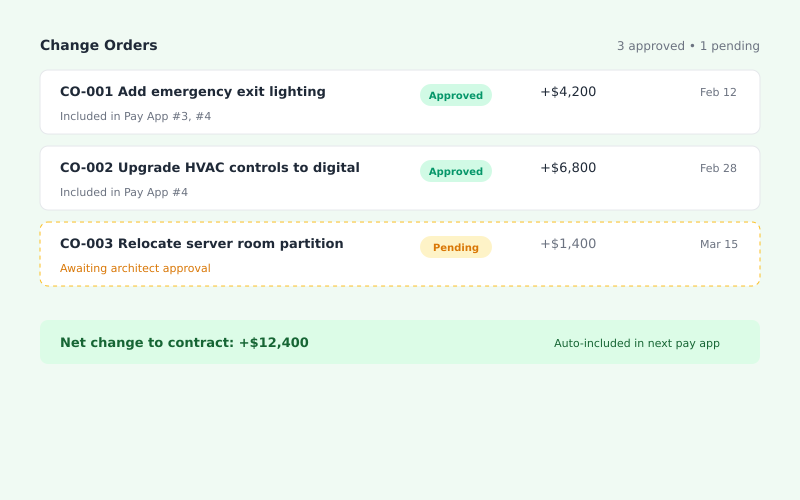
Track approved changes alongside your original contract. They flow into your pay app automatically — no more scrambling at month-end.
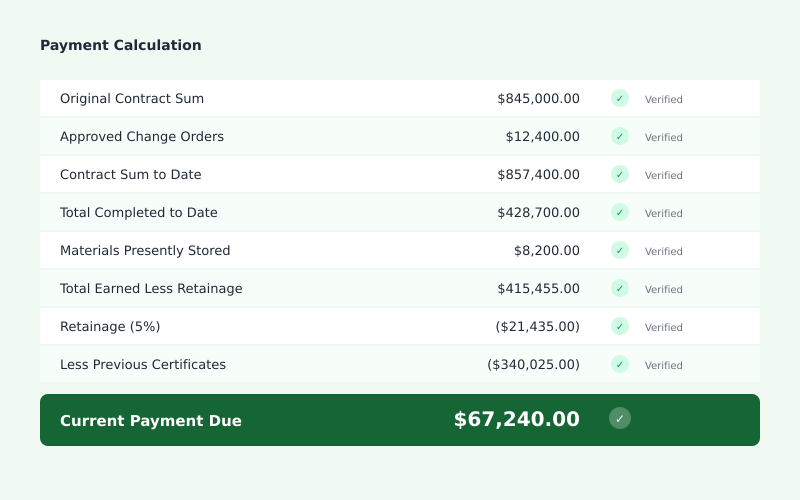
Retainage calculations, stored materials, previous payments — DrawBill does the arithmetic so you don't have to double-check formulas in Excel.
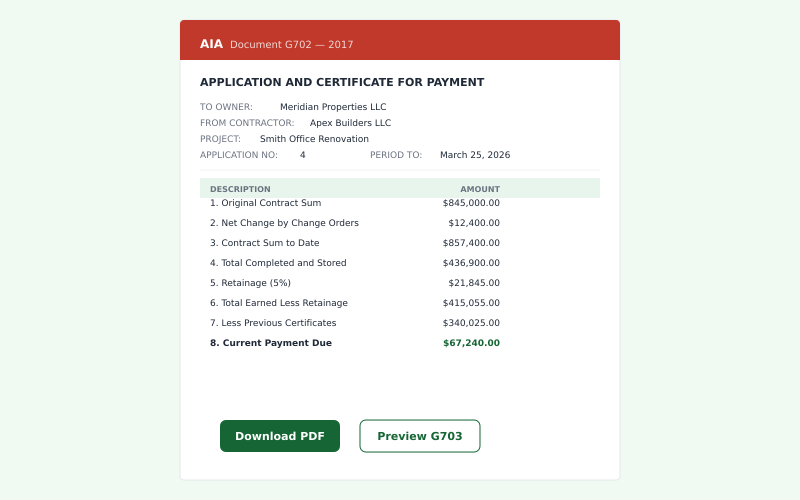
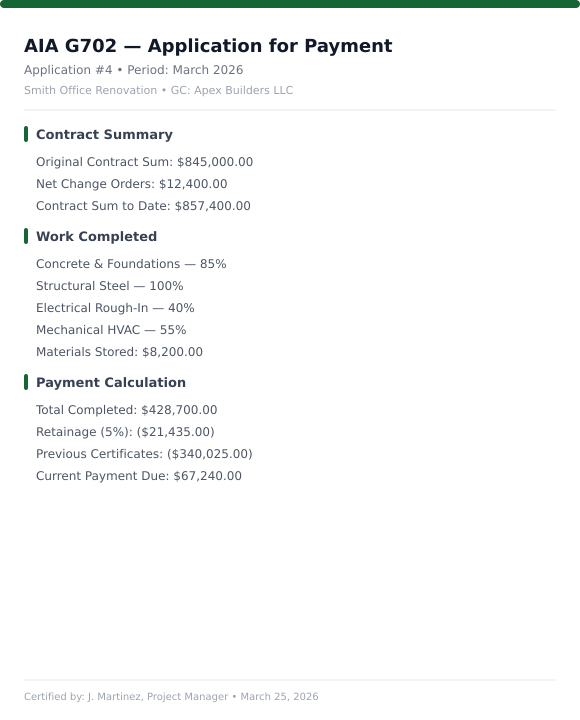
Generate clean, print-ready AIA forms that GCs and owners actually want to approve. No more hand-editing templates.
The AIA G702 (Application and Certificate for Payment) and G703 (Continuation Sheet) are standardized forms published by the American Institute of Architects. They’re the industry standard for requesting progress payments on construction projects across the United States.
Everything you need to know about the platform.
A pay application (also called a draw request or progress billing) is a formal request for payment submitted by a contractor or subcontractor. It documents the work completed during a billing period and calculates the amount owed. Most commercial construction projects use AIA G702/G703 forms as the standard format for pay applications.
The AIA G702 is the summary and certification page — it shows totals and requires signatures from the contractor and architect/owner. The G703 is the continuation sheet that provides line-by-line detail for each work item in your schedule of values. You need both: the G703 provides the backup data, and the G702 summarizes it for approval.
Retainage is a percentage (typically 5-10%) withheld from each payment as security until project completion. To calculate: multiply your total completed work by the retainage percentage. This amount is subtracted from your current payment and held by the owner until final completion or a specified milestone. Some contracts reduce retainage to 5% after 50% completion.
Yes. While the American Institute of Architects publishes these forms, any contractor can purchase and use them. You can buy individual forms or subscribe to AIA Contract Documents for unlimited access. Many contractors use software that generates AIA-formatted documents without requiring separate form purchases.
Most construction contracts specify monthly billing cycles, typically tied to the project schedule. Submit your pay application at the same time each month (often the 25th or last day of the month) to maintain consistent cash flow. Check your contract for specific submission deadlines — missing them can delay payment by an entire billing cycle.
A schedule of values (SOV) is a detailed breakdown of your contract price by work category or trade. Each line item has a dollar value, and the total equals your contract amount. The SOV is established at project start and becomes the basis for all progress billing. A well-structured SOV makes monthly billing easier and reduces disputes about percentage complete. ---
Join contractors who are ready for billing that just works.